Introduction
The release notes give helpful information about the newest version, covering new features, enhancements, and fixing known issues. Use this document with the OrdrAI Protect application's online documentation to get used to the upgraded version and have a smooth experience.
New Features and Enhancements
This section describes new features and enhancements introduced in OrdrAI Protect 9.0.1.
Enhanced Device Purge Operations
In this release, Ordr ensures that devices with attached asset information are not deleted during purge operations. The system automatically excludes these devices from both manual and configured purges. Devices associated with a policy profile remain excluded from purging as well. This update helps protect asset data and ensures the integrity of device records.
MediMizer Integration
In this release, Ordr, a leading provider of cybersecurity solutions for connected devices, and MediMizer Medical Compliance, a healthcare-specialized, cloud-based CMMS provider, have integrated their services. This collaboration allows users to centrally manage and enhance security for connected medical devices through the MediMizer platform, leveraging Ordr's advanced cybersecurity features.
Netdisco Integration
This release supports the integration between Ordr and Netdisco, enhancing network visibility and security. This integration empowers users to make informed decisions, supporting network management capabilities.
Ordr seamlessly facilitates the retrieval of key network information, providing in-depth insights into device configurations, statuses, and neighboring devices, providing a holistic view of the network ecosystem.
Integrating with Netdisco extends to retrieving interface and port information, facilitating resource allocation, and performance monitoring. Additionally, retrieving client information contributes to a thorough understanding of device interactions, aiding in proactively identifying potential security risks. Ordr also introduces DDX rules, enabling users to implement and manage rules based on their requirements. Leveraging DDX rules gives users greater control over the data mapping process, allowing customization of system-defined fields to align with their needs.
ExtremeCloud lQ Integration
The integration between Ordr and ExtremeCloud IQ emerges as a key solution in response to the evolving needs of Network Access Control (NAC) augmentation. As Ordr functions as an NAC augmentation tool, its deployment alongside other NAC solutions is common. The typical scenario involves exchanging device profile information and security events between Ordr and the existing NAC solution. However, the integration with ExtremeCloud IQ goes beyond the conventional approach, addressing the specific requirements of healthcare customers who predominantly rely on on-premises NAC solutions. The integration encompasses Ordr device push, end system pull, and blocklisting.
ExtremeCloud IQ, with its on-premises focus, aligns seamlessly with the prevalent preferences of the healthcare sector. This integration empowers users to leverage Ordr's sophisticated device visibility solutions, exchanging crucial information that includes comprehensive device profiles and security events. The enhanced data exchange facilitates the formulation of precise policies within ExtremeCloud IQ based on the profiling insights derived from Ordr. In the core, Ordr and ExtremeCloud IQ integration redefine the landscape of NAC augmentation, offering a sophisticated and robust solution for healthcare customers relying on on-premises NAC frameworks.
Helix Syslog Integration
This release enhances communication and data exchange through seamless integration between Ordr and Helix Syslog. It enhances real-time capabilities, streamlines device event monitoring, provides a comprehensive audit trail, and optimizes system event management, enabling Ordr users to achieve enhanced incident response.
Microsoft Sentinel Integration
This release introduces the integration between Ordr's Syslog and Microsoft Sentinel SIEM, enhancing the synergy between the two platforms. By seamlessly combining Ordr's Syslog capabilities with Sentinel's robust SIEM functionality, organizations can achieve visibility and responsiveness to security events. This integration streamlines the correlation of syslog data within the Sentinel ecosystem, offering a comprehensive and real-time approach to threat detection and incident response.
Anomali ThreatStream Integration
This release replaces BrightCloud with Anomali ThreatStream in Ordr's integration. Integrating with Anomali ThreatStream automates threat detection and risk assessment for external traffic across connected devices. Ordr now collects comprehensive details on malicious URLs, IP addresses, and files from Anomali ThreatStream, enhancing the platform's capability to identify and assess potential security threats associated with external network traffic.
BMC Integration
In the latest release, Ordr integrates with BMC's Configuration Management Database (CMDB), representing a substantial advancement in device management and cybersecurity alignment. This integration improves device profiling, offering detailed insights into device behavior and meticulous tracking of utilization patterns. The collaboration enhances security by actively protecting vulnerable devices from potential threats. Ordr's interaction with BMC includes collecting asset data to augment the overall context surrounding each device. Through learning asset data from BMC, Ordr enhances the precision of device profiling and strengthens the organization's capability for proactive defense.
Sophos Integration
This release introduces a seamless integration between Ordr and Sophos, focusing on advanced threat detection and response capabilities. Users can leverage Ordr's data within the sophisticated Sophos XDR platform, enhancing their organization's agility in identifying and mitigating evolving cyber threats. This integration emphasizes a commitment to delivering a comprehensive and unified security solution, enabling users to navigate the complex cybersecurity landscape with enhanced confidence and efficiency.
Azure Compute Integration
In this release, Ordr seamlessly integrates with Microsoft Azure Compute, offering an advanced solution for orchestrating and optimizing workloads within the Azure Compute ecosystem. This collaboration enhances the cloud computing experience by providing real-time visibility and precise control over connected devices, ensuring elevated security and compliance for organizations.
Tanium Integration
This release introduces the integration between OrdrAI Protect and Tanium, enhancing the synergy between the two platforms. Organizations can achieve greater control and insight into their network security by seamlessly combining Ordr's asset visibility with Tanium's robust endpoint management capabilities. This integration enables the automatic synchronization of asset data, allowing for real-time device identification, monitoring, and management. With this enhanced correlation between Ordr and Tanium, users can streamline threat detection and incident response, providing a more comprehensive approach to network security.
OSIC Management
This release unveils Ordr's Software Inventory Collector (OSIC), a script-based integration tool for obtaining critical endpoint attributes and ensuring secure data transmission to the Ordr Integration Sensor. OSIC supports flexible deployment from OrdrAI Protect or Sensor (Service Node), and users can easily download the OSIC script for Windows and Linux/macOS machines.
Philips Focal Point Server Integration
In this release, the seamless integration of Ordr and Philips Focal Point servers enhances network security and device management. Ordr's platform seamlessly merges with Philips Focal Point, delivering robust control and visibility for connected medical devices and ensuring a secure and compliant healthcare environment.
CrowdStrike Integration
OrdrAI Protect actively gathers comprehensive device information in this release, encompassing operating systems, vulnerabilities, and incident data. An essential enhancement involves extending data collection to include details on installed applications, specifically targeting devices equipped with CrowdStrike agents. Users must enable additional permission within the CrowdStrike platform to facilitate the seamless application data extraction.
Elasticsearch Integration
This release marks the integration of Ordr with the Elasticsearch platform, enhancing the synergy between the two entities. The integration seamlessly amplifies Ordr's robust device insights, allowing users to generate alerts, reports, and custom analyses effortlessly. Leveraging Ordr's comprehensive understanding of network devices, this integration facilitates the swift and secure transmission of security alerts, device information, and critical data in the Syslog output format. Elasticsearch optimally ingests and parses this information, refining event management and fortifying cybersecurity measures to elevate operational efficiency.
Ordr User Notifications
This release introduces the 'Ordr User Notifications' tile on the Integration page, allowing account users or specific individuals to send email notifications. This functionality proves helpful, for instance, to alert users before system upgrades, communicate outage times, notify users upon system availability, or broadcast other pertinent information to all users within an account.
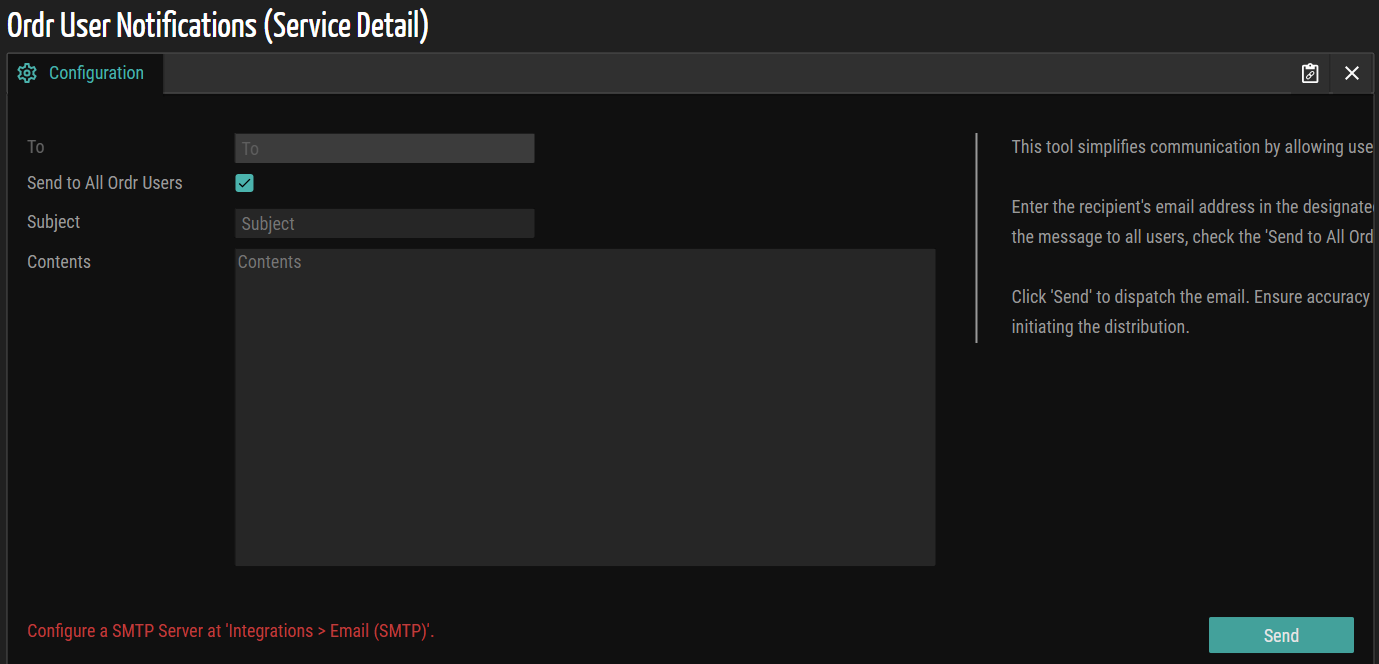
Figure 1: Ordr User Notifications
Integration Vulnerability Optimization
In the previous release, Ordr assigned vulnerabilities based on passive wire data, potentially resulting in duplicate entries during active VA/EDR integration. The Ordr Software Inventory Collector, when enabled, was the sole exception. In the current release, Ordr refines this process by suppressing probable device vulnerabilities under specific conditions: when Crowdstrike/SentinelOne assets are present and enabled or when Qualys/Tenable/Rapid7 Integration is active. This enhancement optimizes vulnerability management, preventing unnecessary entries and ensuring a more efficient and streamlined process. Users experience more precise vulnerability handling, especially in Crowdstrike/SentinelOne or Qualys/Tenable/Rapid7 integration scenarios.
Vulnerability and Incident Response Management
In this latest release, Ordr introduces a vulnerability and incident response management system, streamlining the assignment of incident and vulnerability resolution alarms. Users can input specific details such as assignee, assignee group, due date, priority, state, and comments for individual devices. This enhancement facilitates more precise tracking and resolution of incidents and vulnerabilities and provides users with comprehensive tools to manage and prioritize their workflow efficiently.
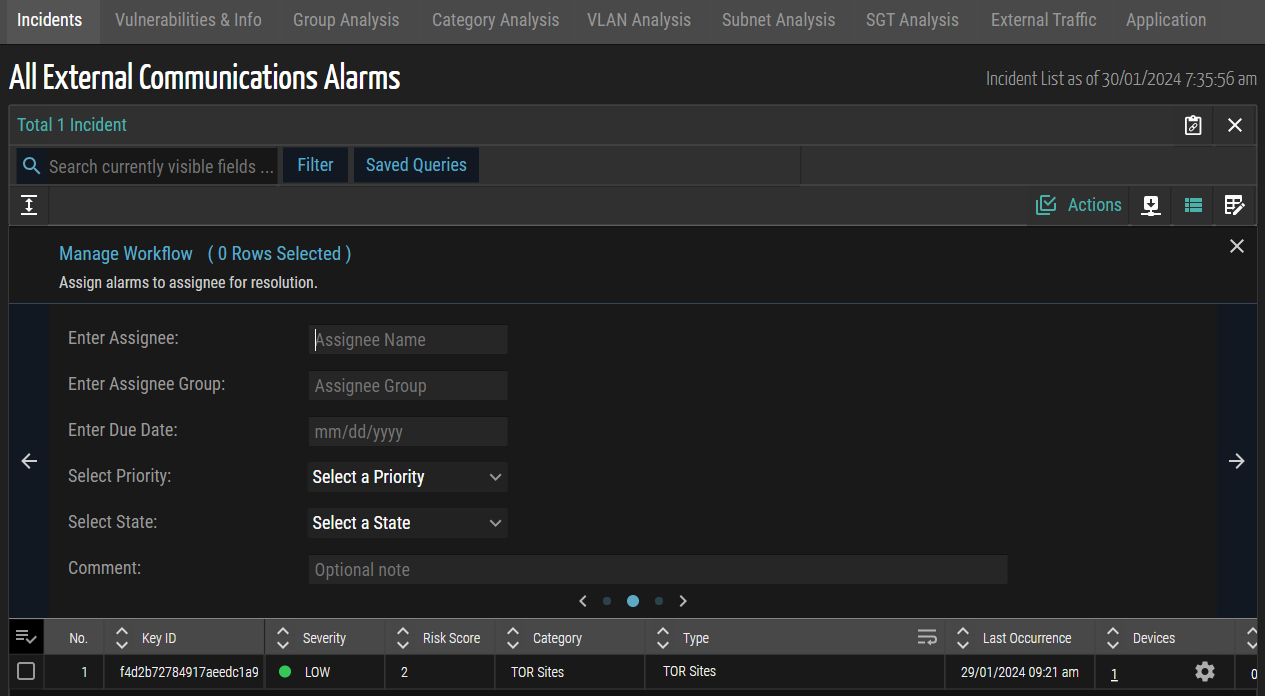
Figure 2: Vulnerability and Incident Response Management
Device Browser Enhancement
Ordr's latest release focuses on optimizing device browser refresh performance. The default automatic device list refresh, previously tied to variable cycles based on system device count, has been enhanced. Users now have greater control when introducing the 'GI_SetTenantDeviceListRefreshInSeconds(seconds)' method. This empowers users to define personalized refresh intervals, providing flexibility and efficiency in managing device updates.
Asset Import via Integration Card
This release incorporates the 'Asset Import' feature into the Integration page as a Tile. Clicking the tile directs users to the Settings > Asset Import page, streamlining the configuration process. Additionally, a "View Imported Asset" button is now available to facilitate the inspection of imported devices.
Hide or Show Column Enhancement
This release empowers users with the "Hide or Show Columns" feature, allowing them to dynamically tailor their views by generating personalized lists, adjusting column visibility, and modifying the display order. Users can customize their interface based on individual preferences and specifications, enhancing efficiency and delivering a more user-centric experience.
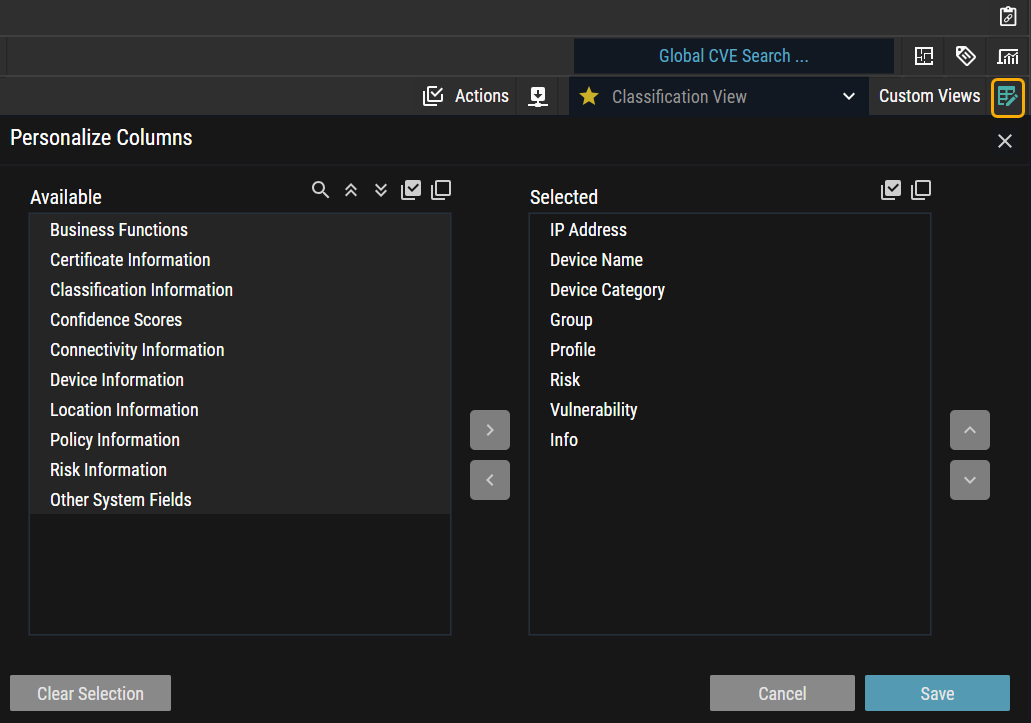
Figure 3: Personalize Columns
Enhanced Vulnerability Search and Sort
Users can seamlessly search and sort through Knowledge Bases (KBs) for specific vulnerabilities in this latest release. This empowers users with a more efficient and targeted approach to managing vulnerabilities, facilitating streamlined access to critical information within the system.
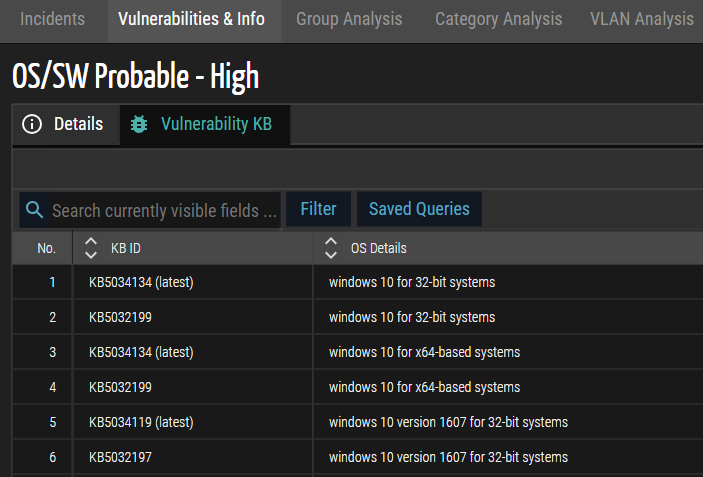
Figure 4: Vulnerabilities KB
Device De-Duplication
OrdrAI Protect undergoes significant improvements in this release, emphasizing GUI support for multiple interfaces. Hosts with multiple interfaces encounter a smoother experience as utilization events and stats under non-primary interfaces are seamlessly consolidated and counted in the Detail Panel's interface tab. The GUI presents all interfaces for multi-interface hosts, enhancing user visibility. Additionally, the Interface tab remains hidden for hosts with a single interface, ensuring a streamlined GUI.
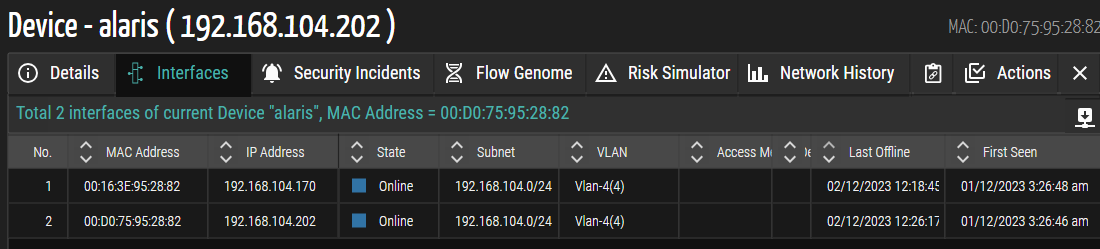
Figure 5: Device De-Duplication
Integration Data Mapping YAML
In this release, the Integration Data Mapping YAML introduces a technical mechanism that facilitates the management of system fields derived from multiple integrations. The YAML configuration prioritizes system fields, explaining their precedence in instances originating from various integrations. This addition provides a granular and structured approach to data integration, ensuring meticulous control over the prioritization of system fields within the integrated ecosystem.
Active Directory LDAP Group Support
Previously, accessing SCE required manually creating local user accounts for individuals using AD credentials.
Ordr addresses this challenge in this latest release by introducing AD group support in OrdrAI Protect, simplifying user management. Users associated with the 'Admin' group can now gain login access with the 'admin' role, while those in the 'Support' group can log in with the 'read-only-admin' role. This update streamlines user onboarding in larger deployments, presenting an efficient mechanism for role assignment based on AD group memberships within the OrdrAI Protect system.
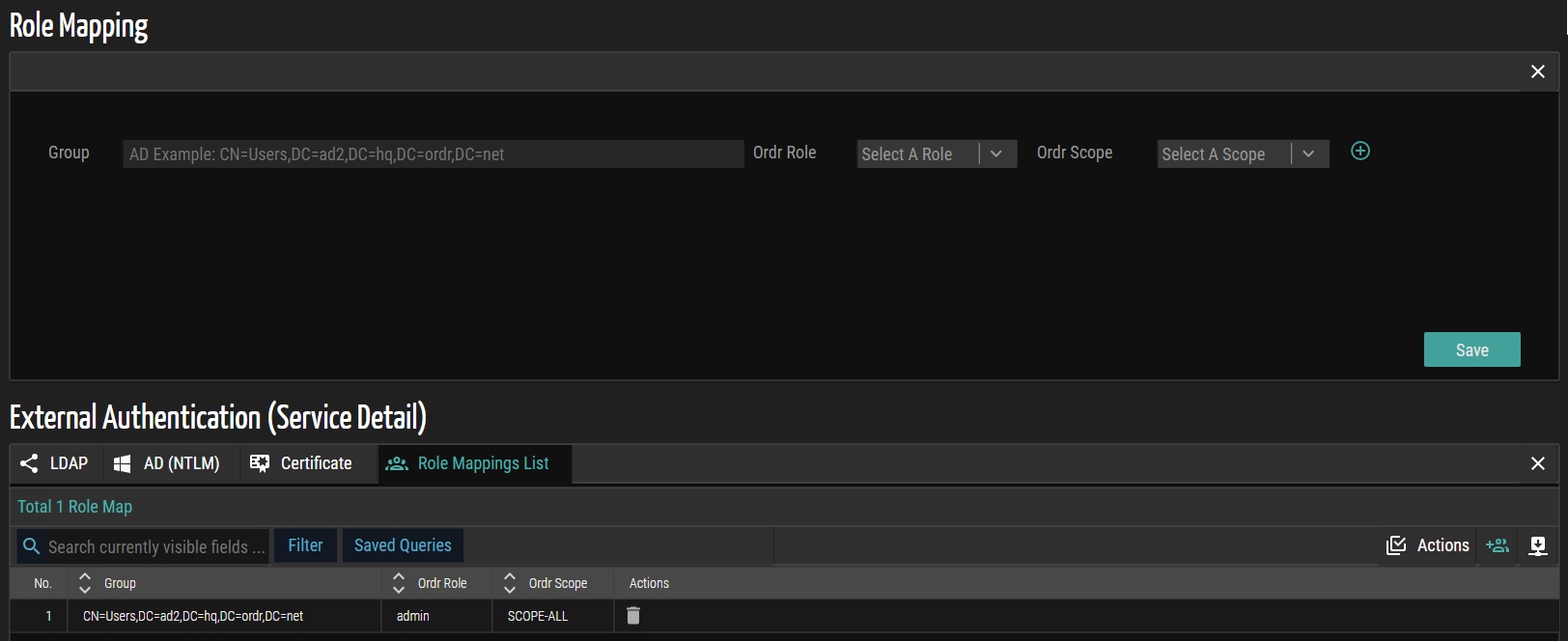
Figure 6: Role Mapping
Device Change Log
This release introduces the 'Change Log' tab, actively showcasing crucial device changes such as Profile adjustments, Risk level shifts, Operating system changes, and Vulnerability variations. This enhancement provides a proactive means to monitor and respond to critical alterations, empowering users with a comprehensive understanding of their system dynamics.
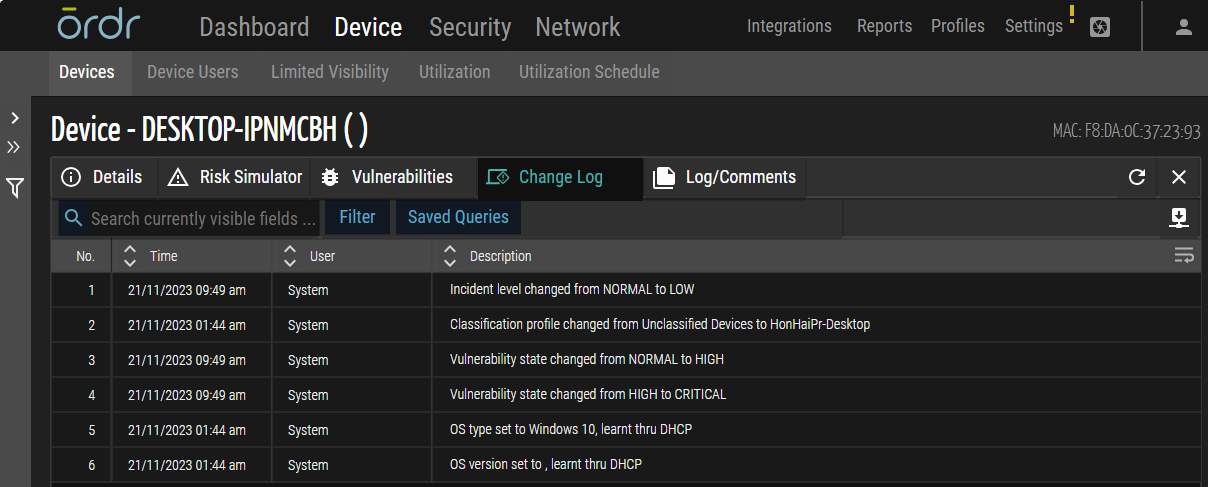
Figure 7: Device Change Log
Vulnerability Management Enhancement
In this release, Ordr has implemented several significant enhancements to optimize the system's capabilities and improve the user experience.
- Integration of CVE ID Column: A pivotal addition to this release is the introduction of the CVE ID column in two critical sections of the Ordr platform – the Vulnerabilities tab within the Device page and the Vulnerabilities list panel under the Security page.
- Renaming the Score Column to CVSS Score: Ordr has renamed the Score column to CVSS Score within the Vulnerabilities page to enhance uniformity.
- Introduction of Key Columns in Incidents/Vulnerabilities Panels and Device Details: This release introduces four pivotal columns within the Incidents/Vulnerabilities panels and the Vulnerabilities tab under the Device Details panel. These columns, namely Assignee, State, Due Date, and Resolution Date provide granular insights into the status and progress of incidents and vulnerabilities.
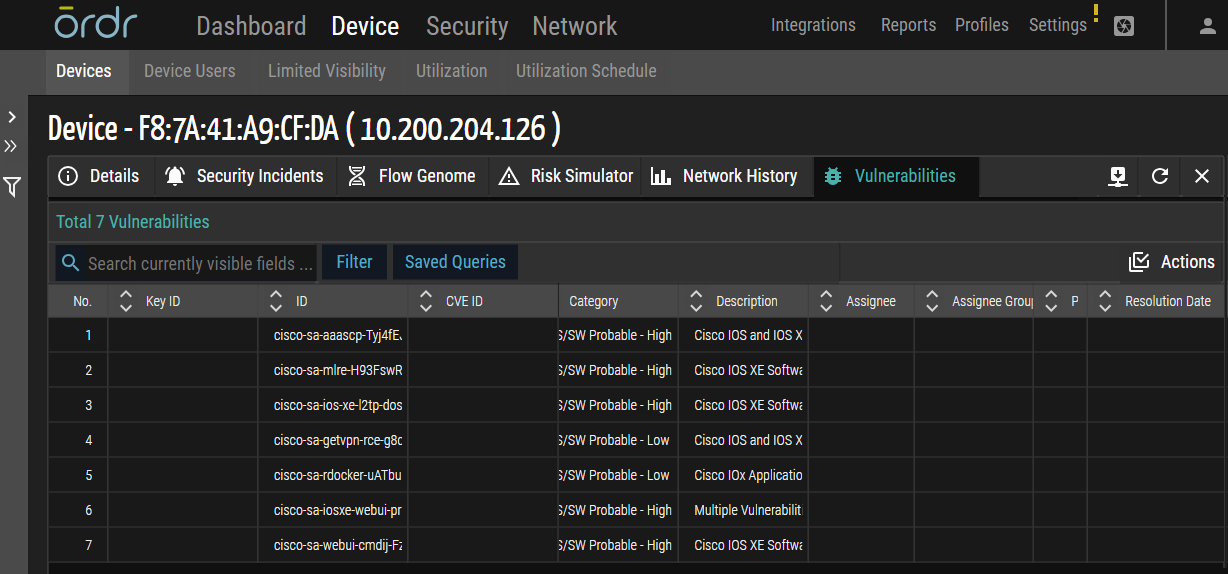
Figure 8: Vulnerabilities
- Workflow Management for Alarms: This feature provides users with a centralized platform to manage the lifecycle of alarms efficiently. This feature ensures a systematic and organized approach to incident response, from assignments to tracking state changes and setting resolution deadlines.
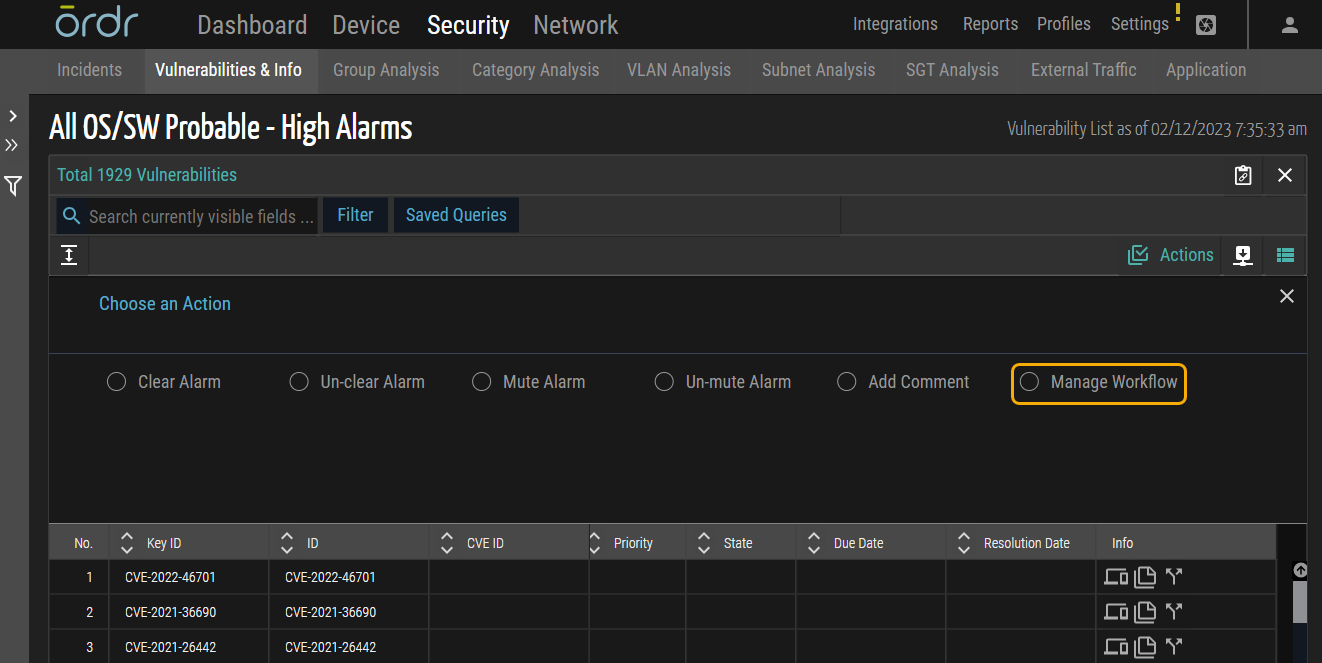
Figure 9: Manage Workflow
Network SNMP Discovery Enhancement
In this release, Ordr has enhanced the 'Test Network Device Connectivity' page by integrating the following authentication methods alongside the 'sha' and 'md5' authentication methods:
- sha224
- sha256
- sha384
- sha512
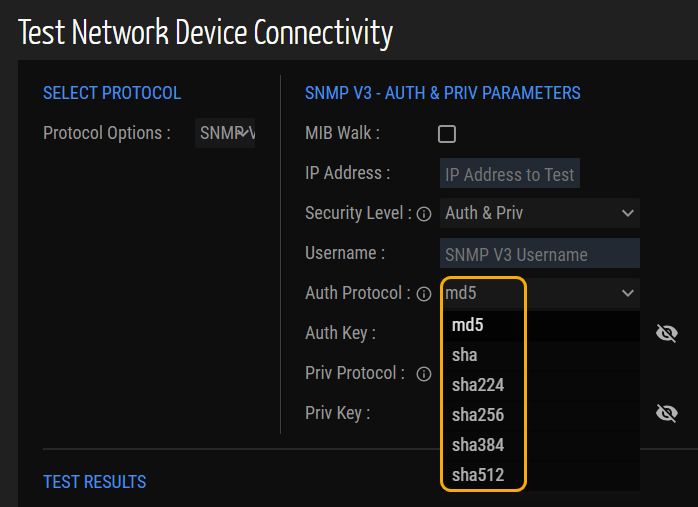
Figure 10: Network Device Connectivity
Enhanced Device Details Panel
In this release, Ordr has optimized the graphical user interface by introducing a dedicated section for displaying the 'Location' and 'Business Function' groups on the Device Details page. This enhancement gives users a more organized and intuitive layout for efficient navigation.
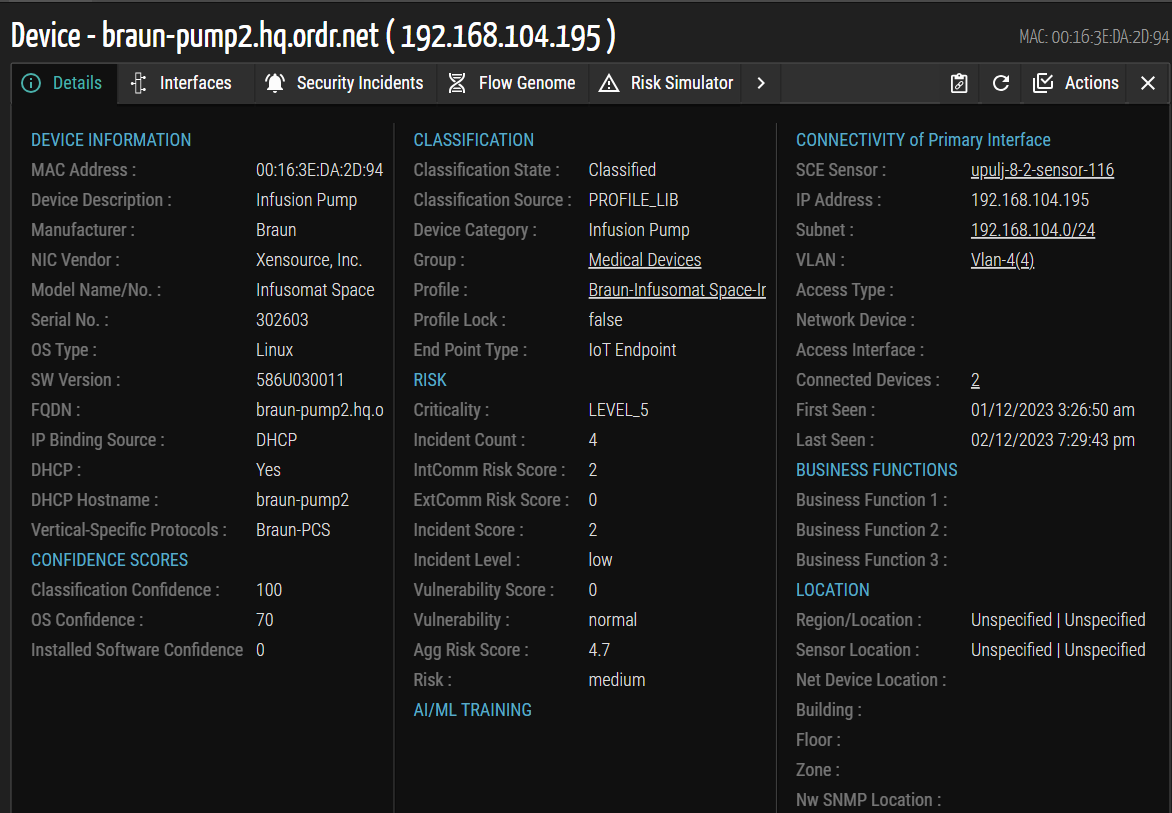
Figure 11: Device Details
Meraki Multiple Instance Support
This release enhances Meraki support by introducing multiple instances, providing increased flexibility and scalability for users' diverse requirements.
Unified Risk Assessment and Risk Simulator
Unified Risk Score Calculation
The current product features two distinct risk scores – the cyber risk score, calculated from System vulnerabilities and exploits, and the clinical risk score, determined by Connectivity and PHI risk factors.
This release focuses on unifying these scores into a comprehensive risk score by combining all relevant factors. The system now calculates the risk score for a device based on the following factors:
- Vulnerabilities
- External Communications
- Internal Communications
- Connectivity Risk
- PHI Risk (which unifies cyber, environmental, and PHI risk)
Vulnerability Risk Calculations
Currently, a device estimates its risk score as normal if it possesses a vulnerability but lacks external or internal communications events.
In this updated release, the methodology considers the cumulative sum of all risk scores, considering each section's score and its corresponding weightage. It does not analyze additional conditions, normalizing the risk based on asset criticality.
Clinical Risk Score and YAML Configuration
In this release, the PHI Score, a clinical risk metric tailored for medical devices, operates distinctly. The 'security-risk-config.yaml' file actively excludes the PHI Score for non-healthcare verticals while actively incorporating it for Healthcare. The file encompasses Vulnerabilities, External Communications, Internal Communications, Connectivity Score, and PHI Score. Loading the YAML file depends upon the instance watermark.
Healthcare Vertical YAML
- Vulnerabilities: 20%
- External Communications: 30%
- Internal Communications: 30%
- Connectivity Score: 10%
- PHI Score: 10%
Non-Healthcare Vertical YAML
- Vulnerabilities: 20%
- External Communications: 30%
- Internal Communications: 30%
- Connectivity Score: 20%
Risk Simulator
The device details page in this release shows Asset Criticality, Risk Score, and Risk Level. Extra details transition to the risk page, featuring connectivity risk scores. The Risk Simulator page specifies the calculation mode (MAXIMUM/AGGREGATE), renaming the aggregate risk score field to "Risk Score." Additionally, an impact on the score based on criticality is introduced next to Asset Criticality. This addition clarifies how the score is calculated, with Level_3 having zero impact and other levels necessitating further explanation.
The release standardizes on one Spider chart, facilitating visualization of changes in the existing chart due to risk score calculations. This enhancement provides users with a clear and concise overview of device risk.
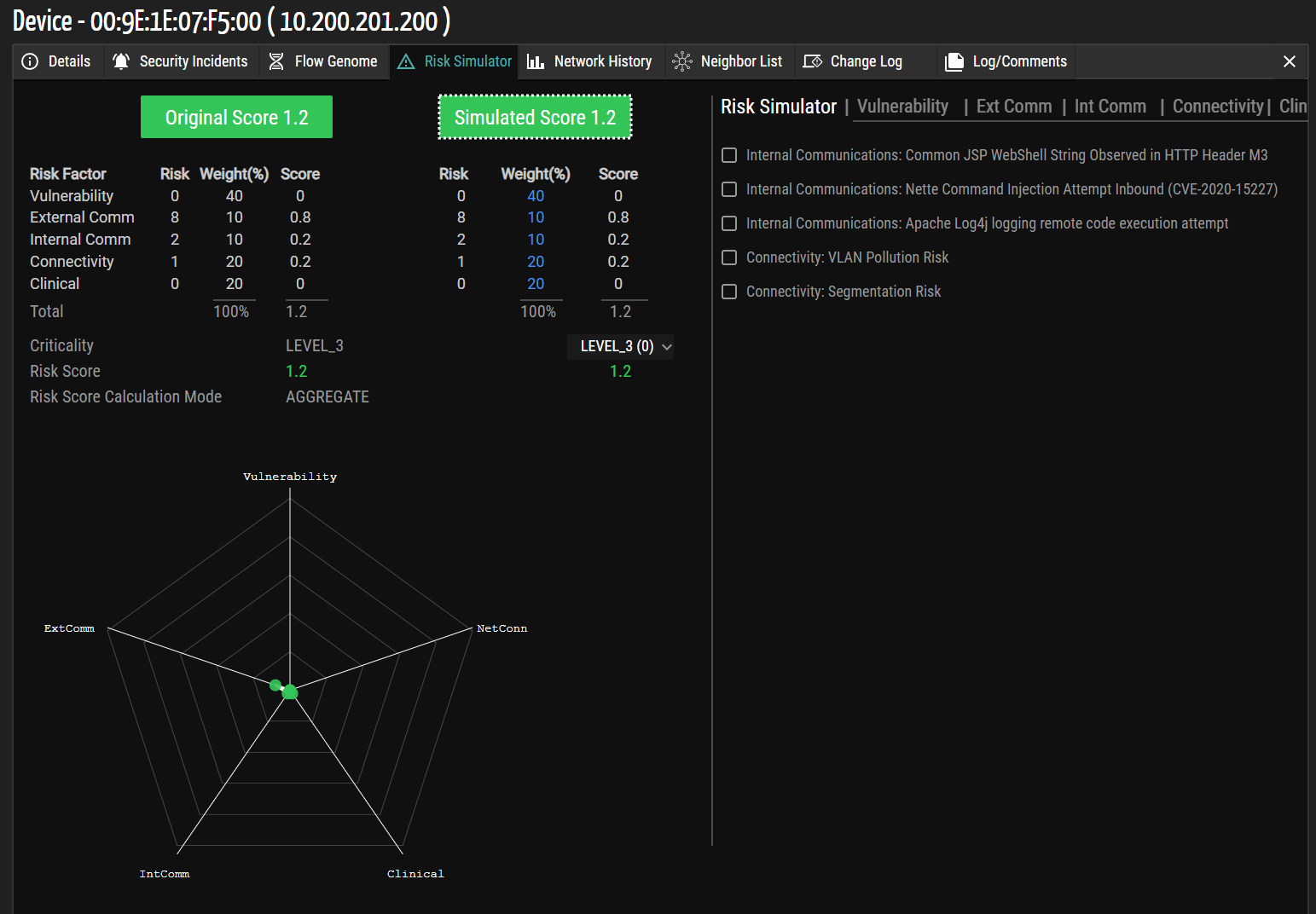
Figure 12: Risk Simulator
Connectivity Parameters for Risk Calculation
The risk score is now calculated based on the following parameters:
- VLAN Score:
- Isolated VLAN: 0
- Mixed VLAN with 1 group: -1
- Mixed with more than 1 group: -3
- Network Connection Score:
- Wired: -1
- Wireless: -3
- Segmentation Score:
- Segmented: 0
- Not Segmented: 4
The total connectivity score is the sum of VLAN, Network Connection, and Segmentation Score.
Scheduled Email Reports
The 'Reports Email Admin' option enhances scheduled email reports in this release. Admin users can now manage a comprehensive list of recipients' email addresses. They can view and delete addresses across users, overcoming limitations from the previous version.
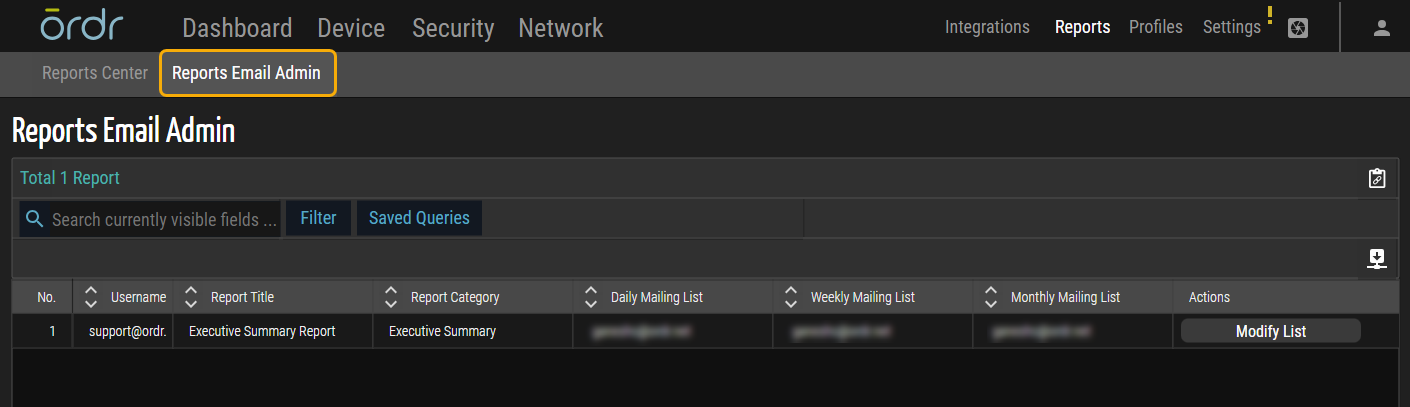
Figure 13: Reports Email Admin
Sensor Optimization
In this release, Ordr enhances user experience with a graphical user interface (GUI) indicator, promptly alerting users if their Ordr OVA sensor's virtual machine (VM) falls below the recommended size. Careful evaluation of span rate data is essential for informed CPU and RAM configurations, preventing issues like slow performance and security vulnerabilities. This indicator is crucial for aligning with network security best practices.
Assign VLAN by Profile
This release enhances the Policy Profile page, incorporating SGT and VLAN tags when exclusively configured with Cisco ISE. Users can now actively input the VLAN values into the designated text box, providing increased flexibility. The default drop-down menu for VLAN tag selection in a Policy Profile, present in the previous version, has been eliminated to streamline the user experience.
Additionally, Ordr enables users to remove or unassign VLANs actively, enhancing overall control and customization options in this release.
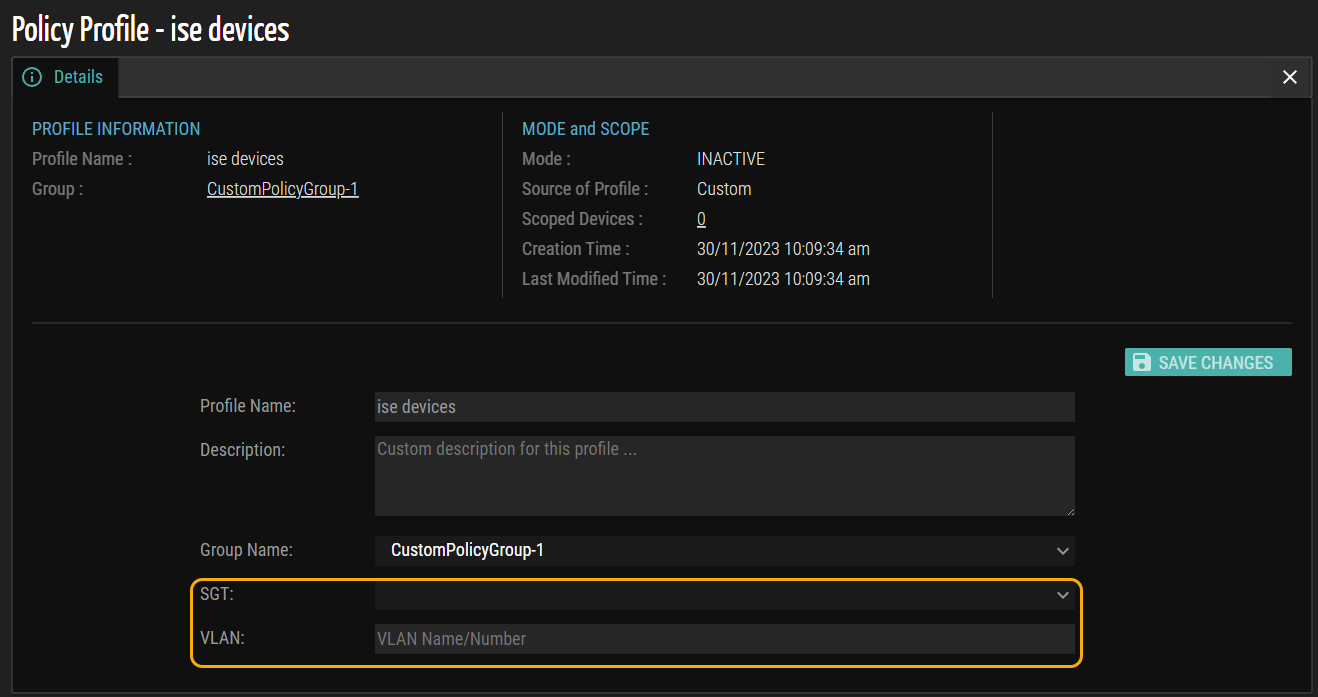
Figure 14: Policy Profile
MAC Suffix Differentiator
In this release, Ordr has enhanced the representation of the proxy (Gateway) and proxied devices (devices behind the gateway). Previously, the designation used G- and p- prefixes attached to the IP address field. However, the current approach utilizes suffixes of _g and _p appended to the MAC address. This alteration arises from recognizing that the Proxied/Gateway concept aligns more closely with Layer 2 (L2) rather than Layer 3 (L3). With the introduction of multiple IPs for a single interface, it becomes necessary to identify the proxy/gateway based on L2 identification (MAC) rather than L3 identification (IP). This update effectively resolves potential issues arising from the absence of L3 identity, thereby preventing the previous prefixes from being utilized effectively and potentially avoiding interrupted connectivity.
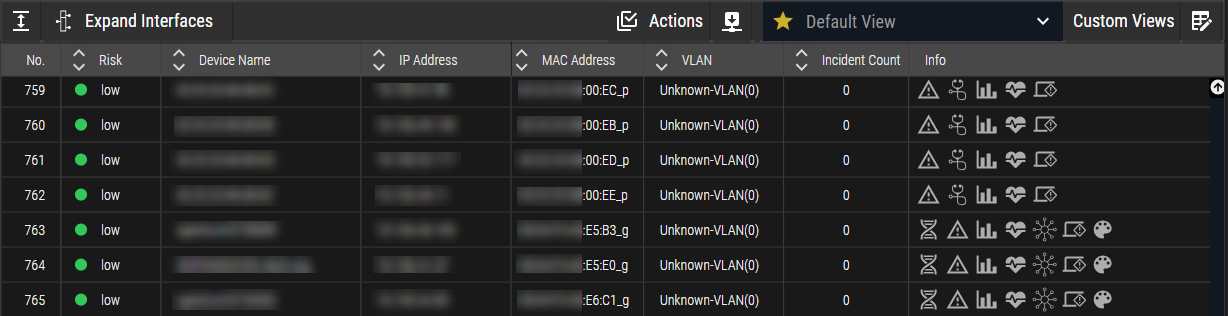
Figure 15: MAC Suffix Differentiator
Software Bill of Materials
OrdrAI Protect introduces the Software Bill of Materials (SBOM), a comprehensive inventory system tracking software components in this release.
SBOM integration facilitates systematic documentation and management of software components deployed across the network infrastructure. Through analyzing SBOM files, OrdrAI Protect can proactively identify and mitigate security vulnerabilities associated with software components. Users gain a comprehensive view of software assets, including libraries, frameworks, and modules, providing deeper insights into the software composition. Moreover, SBOM functionality ensures compliance with regulatory requirements and software licensing agreements, reducing the risk of legal and financial penalties.
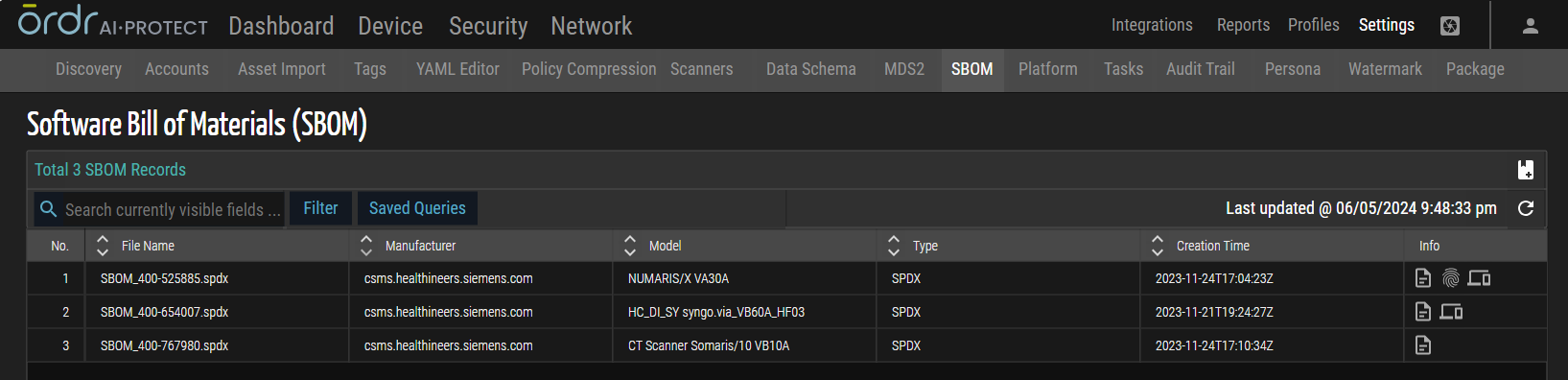
Figure 16: SBOM
Advanced Search Enhancement
This release modifies the Advanced Filter search behavior, requiring users to manually press the Enter key to start the search rather than initiating it automatically when typing.
© 2025 Ordr. All Rights Reserved.